Highlights
Driver onboarding New
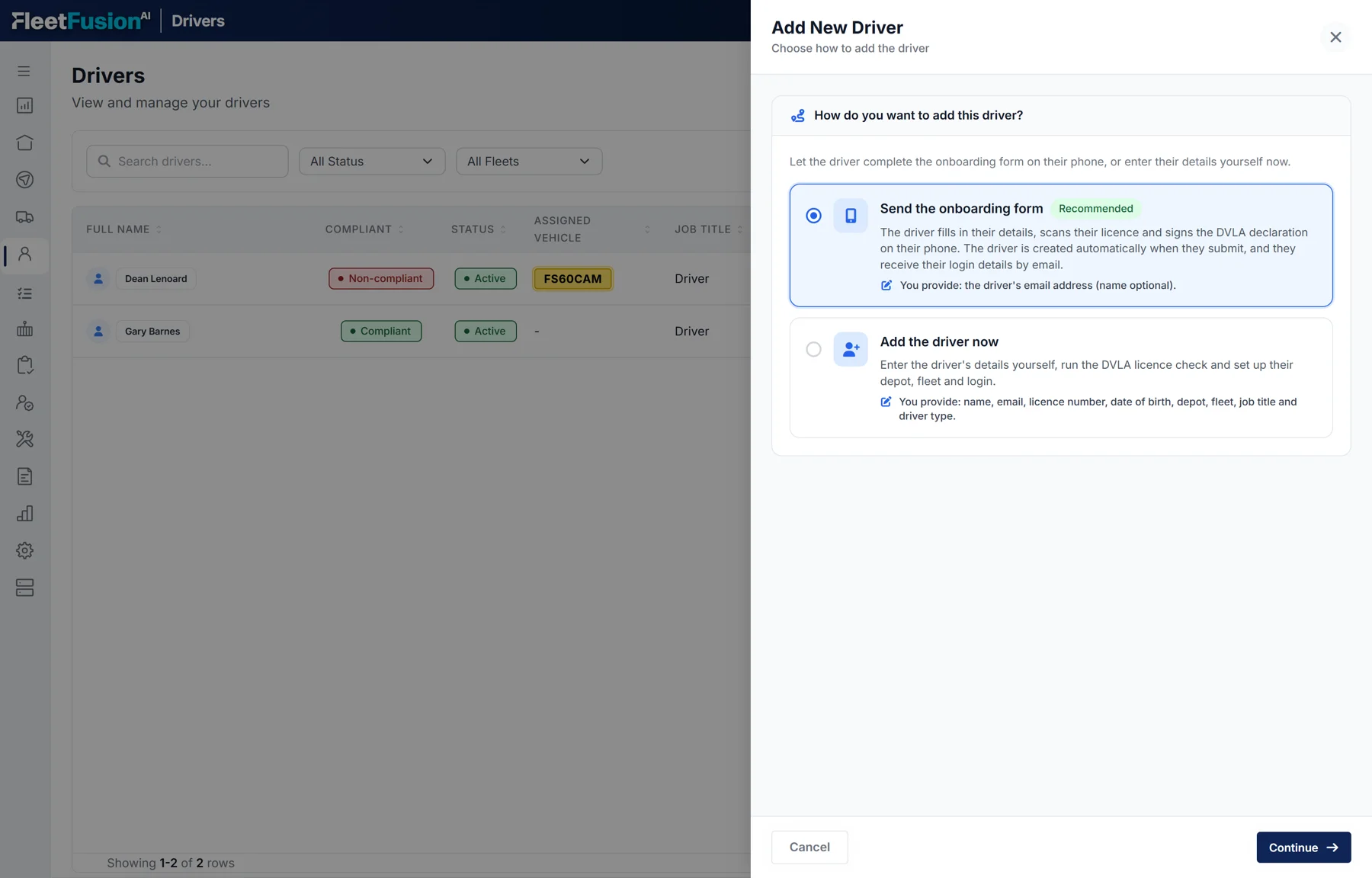
Onboard a new driver from their phone, with no app to install and no paper forms.
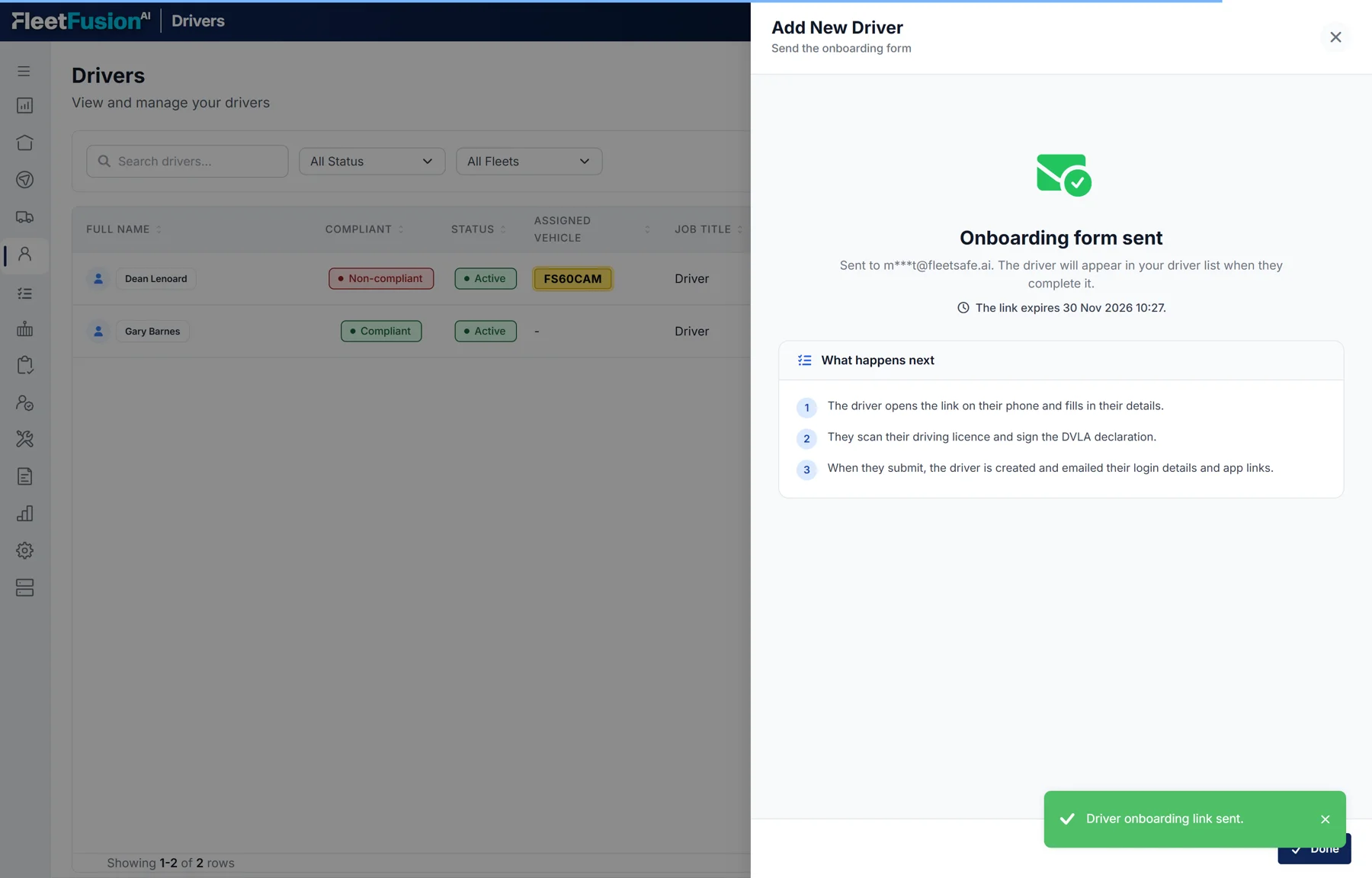
- From the driver’s record, send a secure invitation. The link works once and expires after 72 hours.
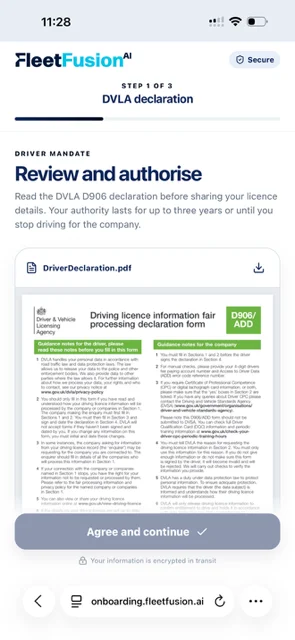
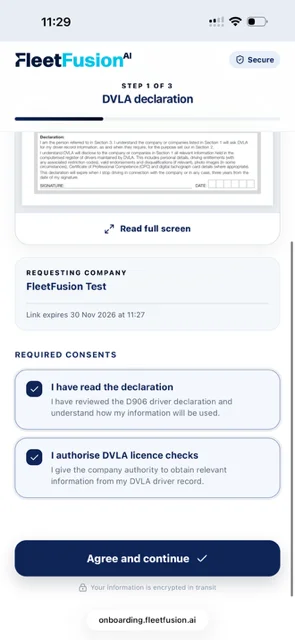
- On their phone, the driver reads and signs the D906 DVLA consent and photographs the front and back of their licence. An outline guides the photo and the licence details are read automatically.
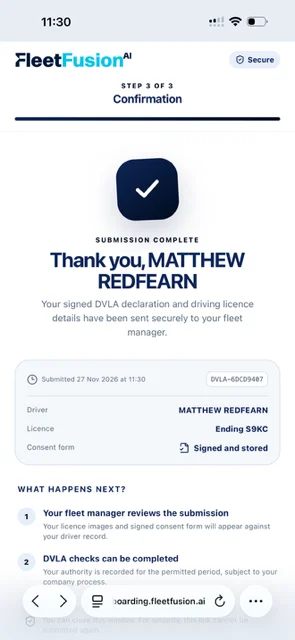
- When they submit, FleetFusion fills in the driver’s record and licence details and stores the signed consent PDF with their documents. A three-year DVLA mandate is recorded, so the driver is ready for scheduled licence checks.
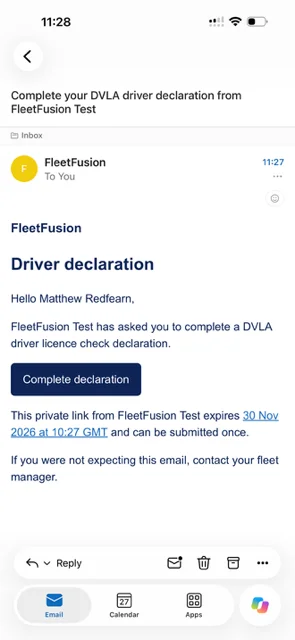
- Only have an email address? Invite the driver anyway. FleetFusion creates the driver when they submit and emails them their driver app login and download links.
Email Inbox On request
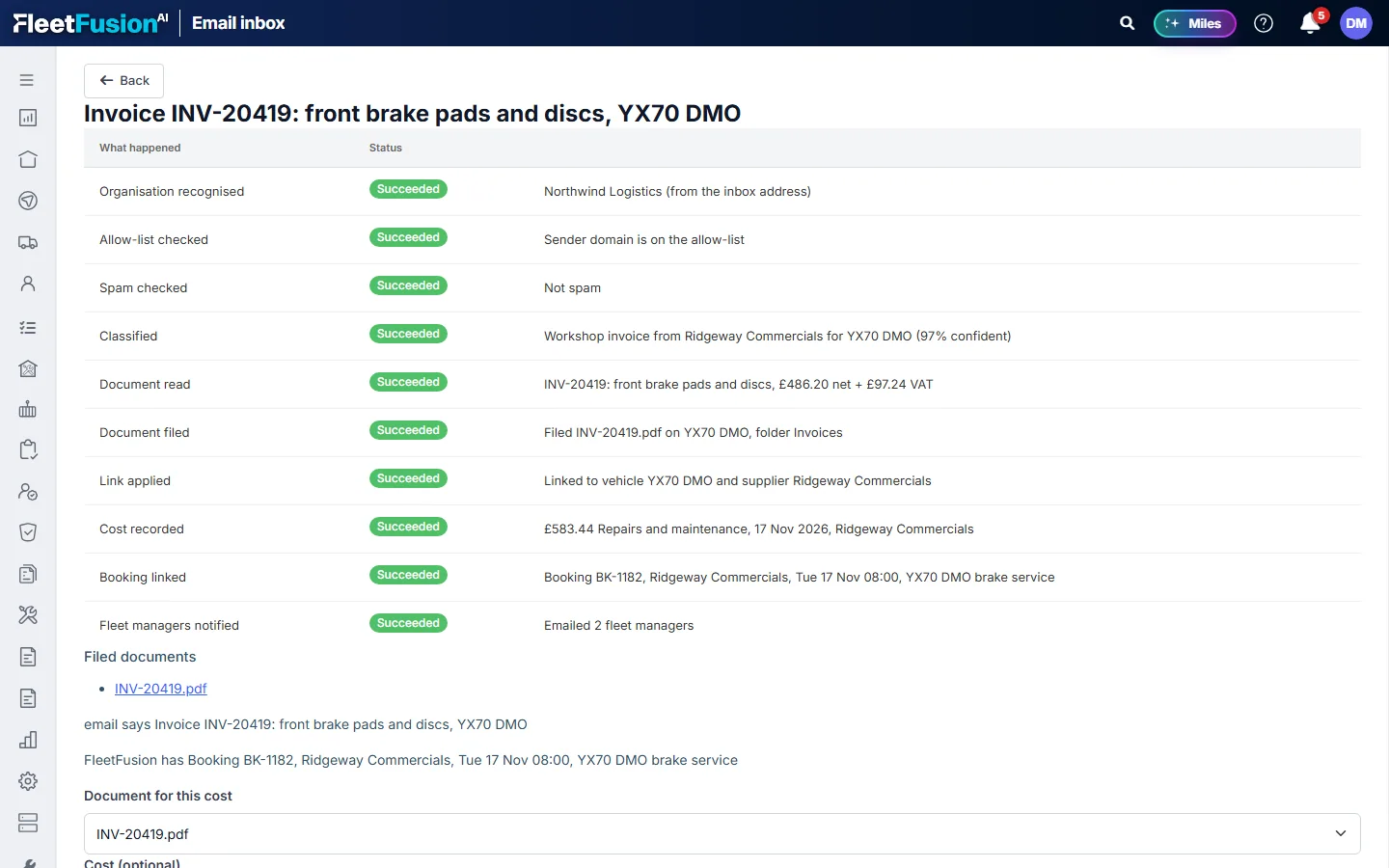
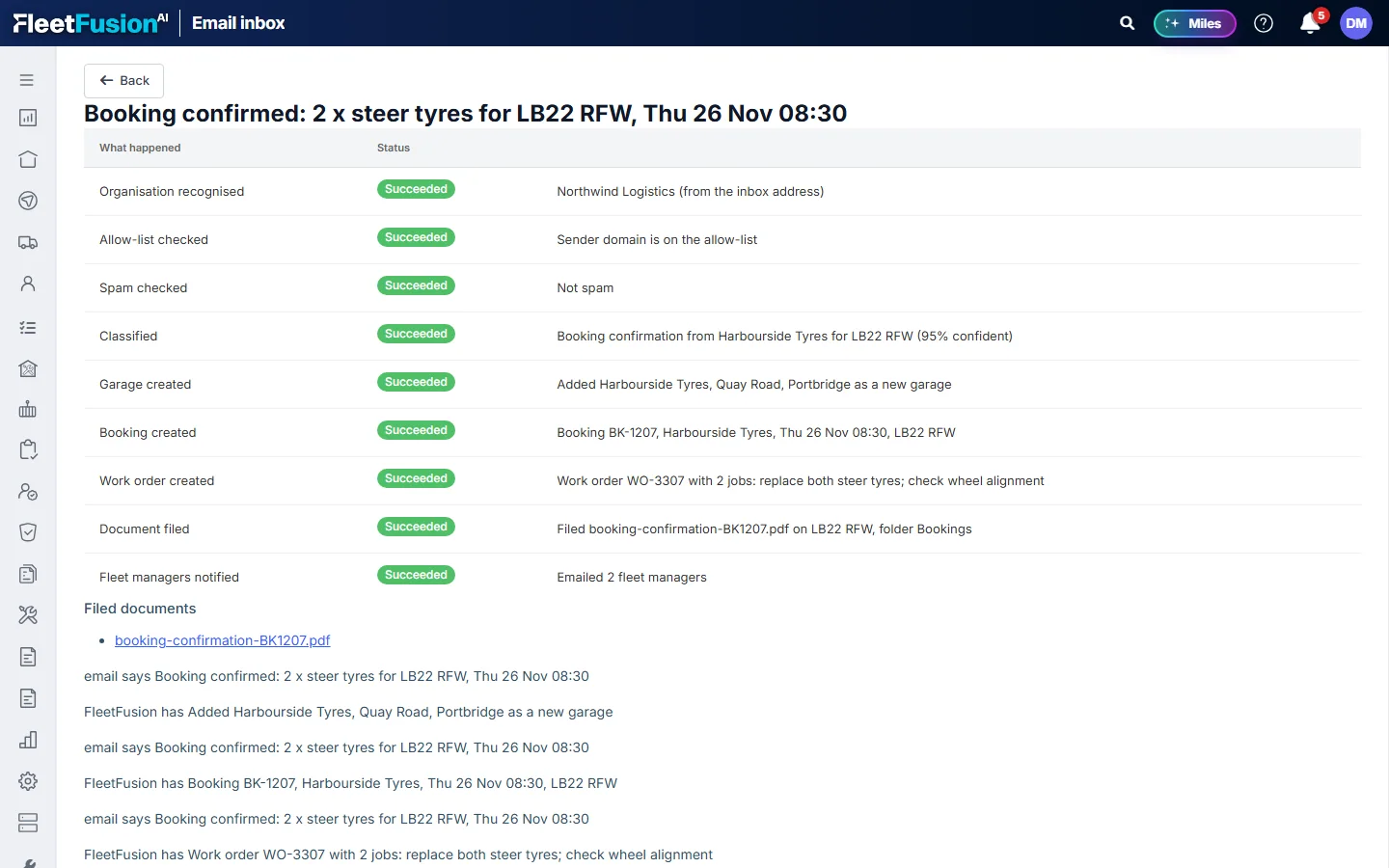
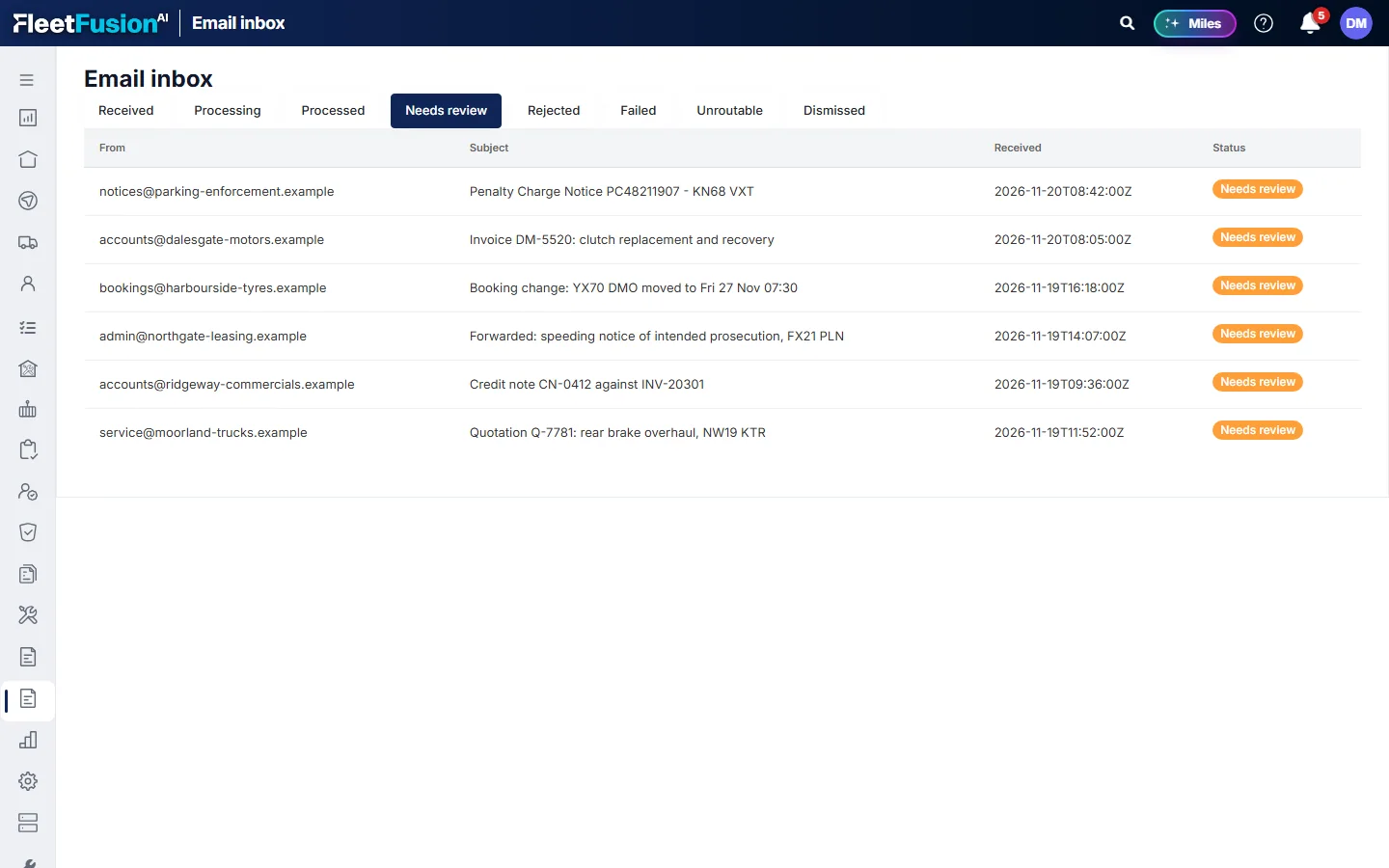
Your company gets its own FleetFusion email address. Send workshop invoices, booking confirmations and parking notices to it, and FleetFusion’s AI reads each email and its attachments and files them in the right place.
- Invoices are filed against the vehicle, with the cost recorded and linked to the existing booking.
- Booking confirmations add the garage if it’s new, create the booking and open a work order with the jobs listed. Your fleet managers are told.
- Parking and penalty notices are filed against the vehicle and flagged. A notice for a registration that isn’t in your fleet waits for review instead of being guessed at.
- Needs review: anything the AI isn’t sure about waits in a review queue for a person to check, with a counter in the top bar.
Video in driving-event emails New
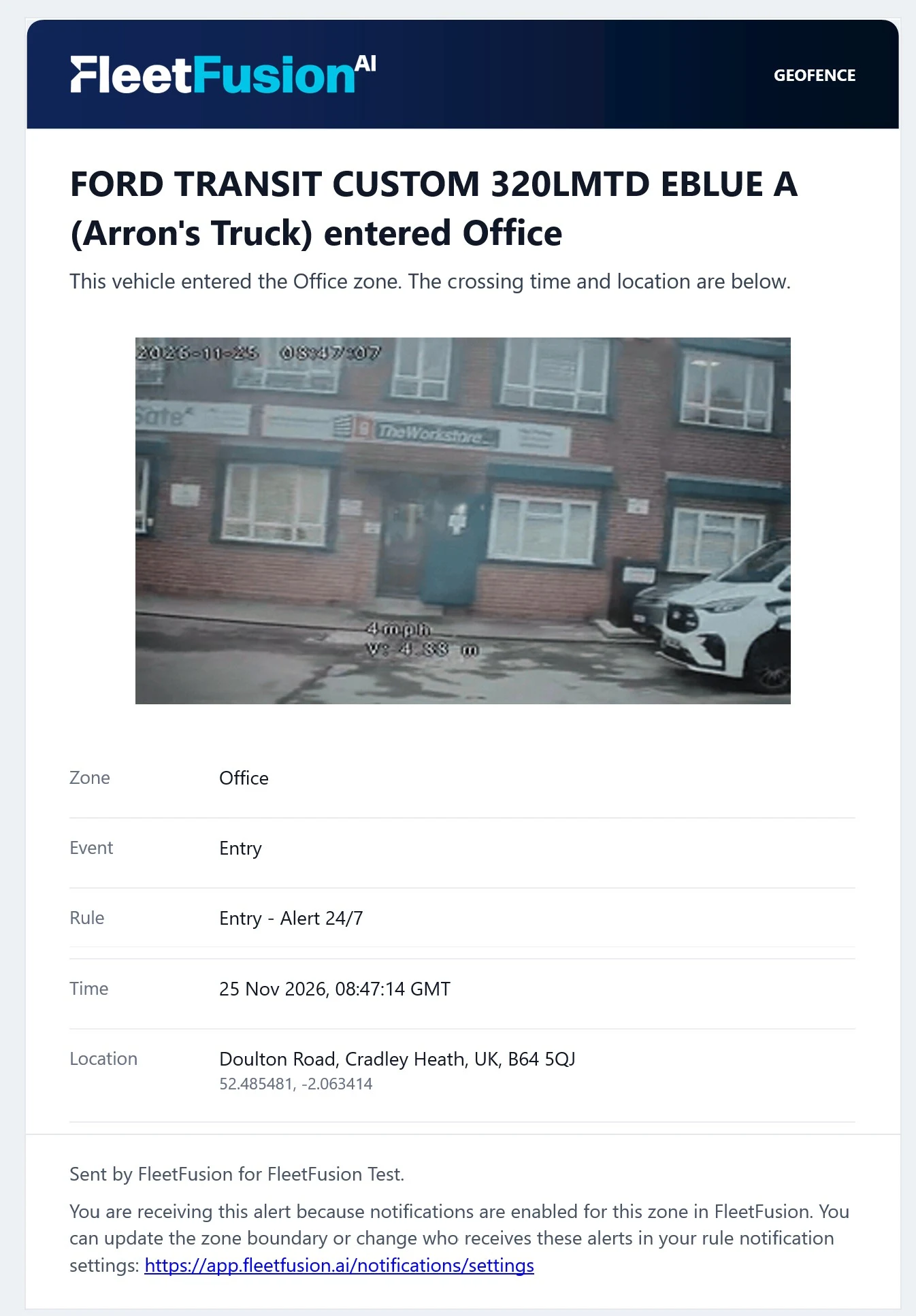
Driving-event emails now wait for the camera clip and include an animated preview of the 7.5 seconds around the event, with a link straight to the event in FleetFusion.
- Each person chooses which event types they’re emailed about, how often, and which address is used. Admins can set up recipient lists.
- Every FleetFusion email now shares one design with your logo, and displays correctly in Outlook and on phones.
- Share an event with up to 20 people, such as your insurer or a claims handler. Each person gets their own revocable link that opens the video without a login and expires after 24 hours, 7 days or 30 days.
Safety analytics dashboard New
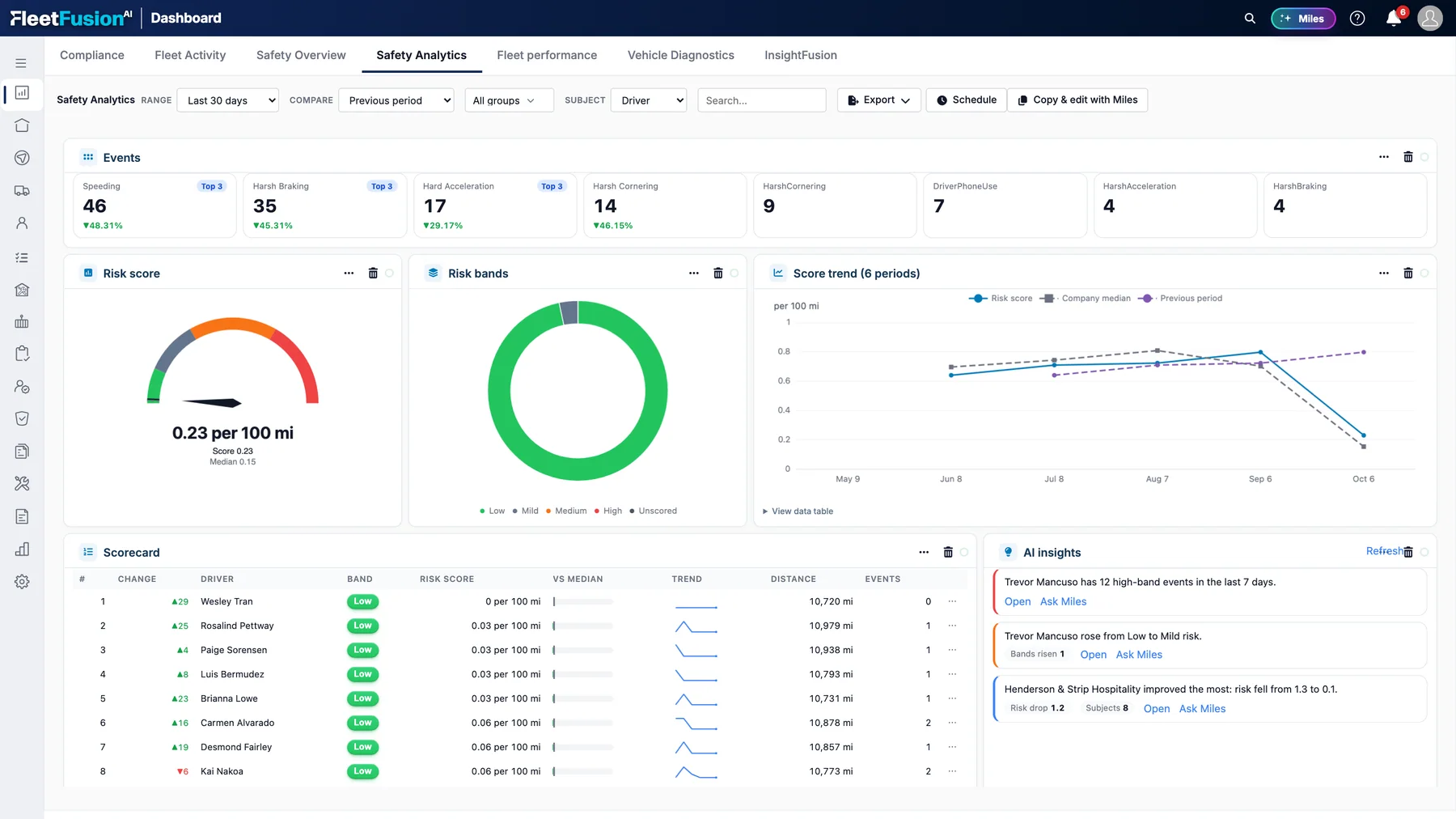
A new 20-tile Safety analytics dashboard brings driver risk, insights, event triage, media and coaching into one view, in the portal and the MyGeotab add-in.
- Cross-filter every tile, switch between counts and rates, and drill down to the events behind any figure.
- Export to Excel or PDF, share with just yourself, your organisation or chosen roles, and schedule it by email.
Fleet performance dashboard New
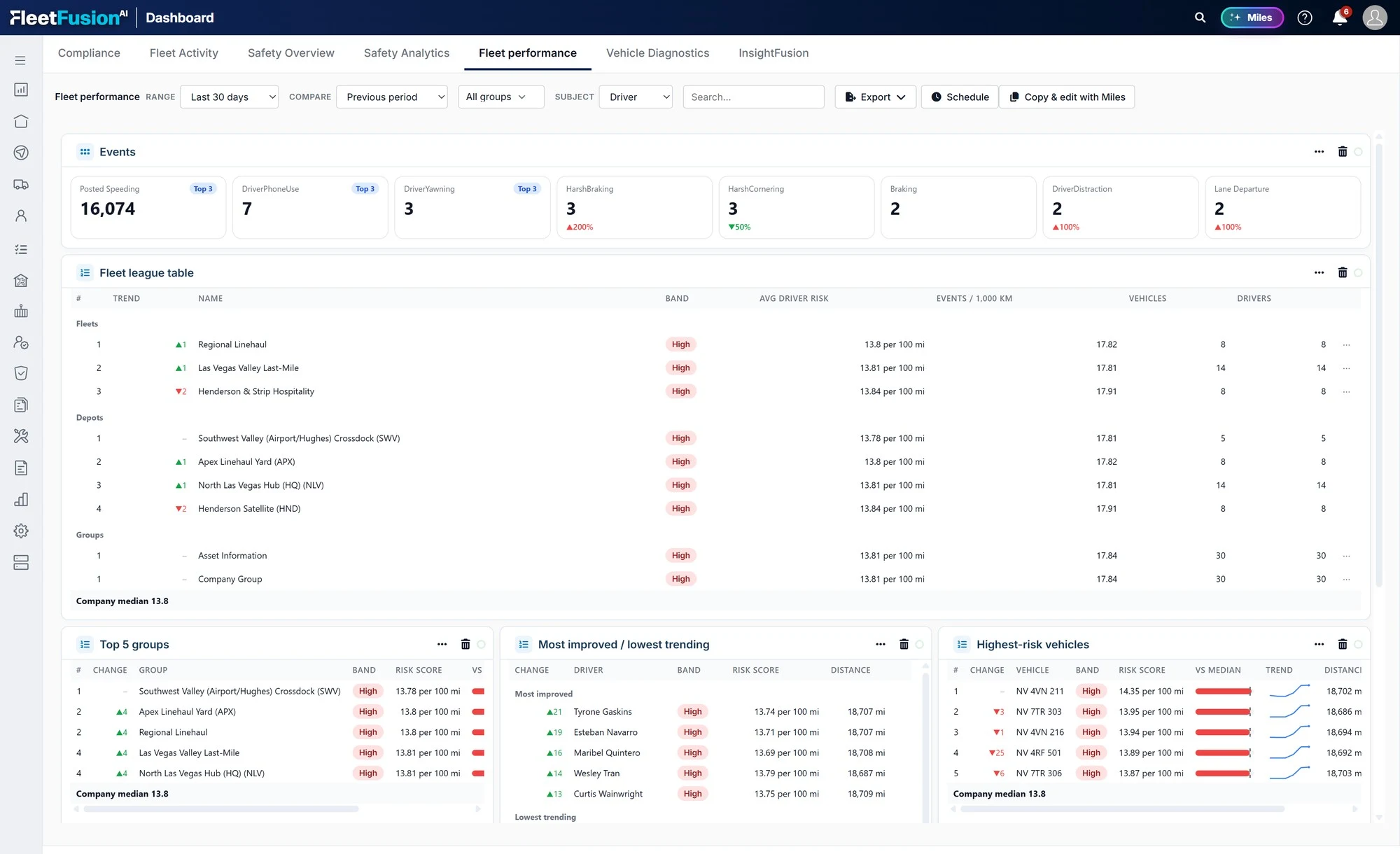
A new Fleet performance dashboard ranks your fleets, depots and groups by driver risk, and shows what is improving and what needs attention.
- Pick a date range, compare it with the previous period, and look at drivers, vehicles, fleets or groups.
- Event tiles show the top event types and how much each has changed.
- A league table ranks fleets, depots and groups by risk band, average driver risk and events per 1,000 km, with each one’s change in position.
- Panels show the top five groups, the most improved and lowest-trending drivers, and the highest-risk vehicles compared with your company median.
- Export it, schedule it by email, or copy it and edit it with Miles.
Fleet briefing email On request
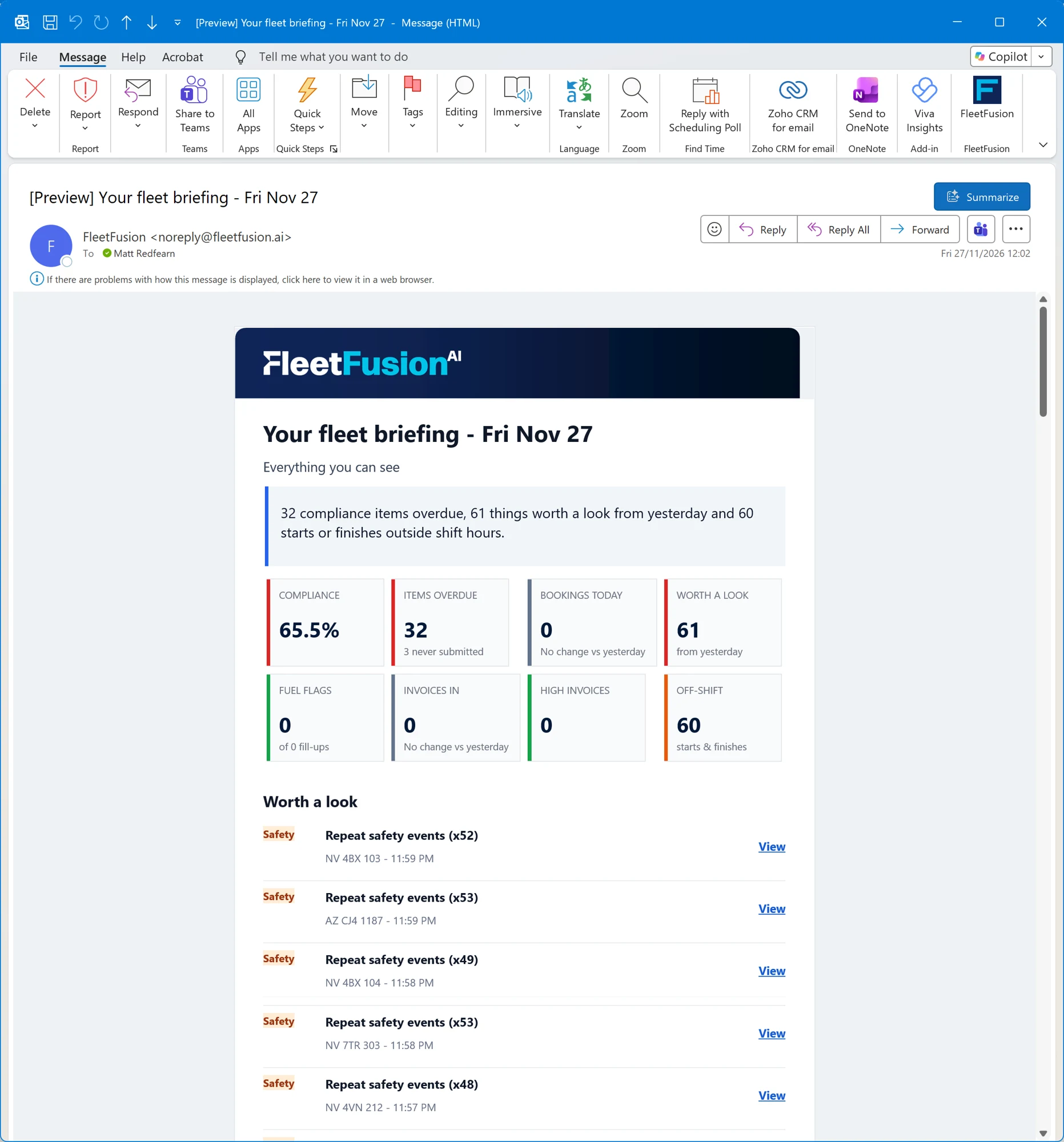
One email each morning that tells you what needs attention across your fleet, for the depots and fleets you choose.
- An AI headline sums up the day, followed by tiles for compliance, items overdue, today’s bookings, things worth a look, fuel flags, invoices and off-shift use.
- Compliance and maintenance: expiring and overdue vehicle and driver requirements, today’s workshop bookings, and vehicle health in plain English with urgency and a rough repair estimate.
- Operations: safety events, incidents and defects since your last briefing, early and late starts and finishes, fleet utilisation and idling, and the safety trend with your riskiest drivers.
- Costs: unusual fuel fill-ups (over tank size, out of hours, wrong fuel, away from site, duplicates or too frequent), invoices received, and invoices far above what you normally pay.
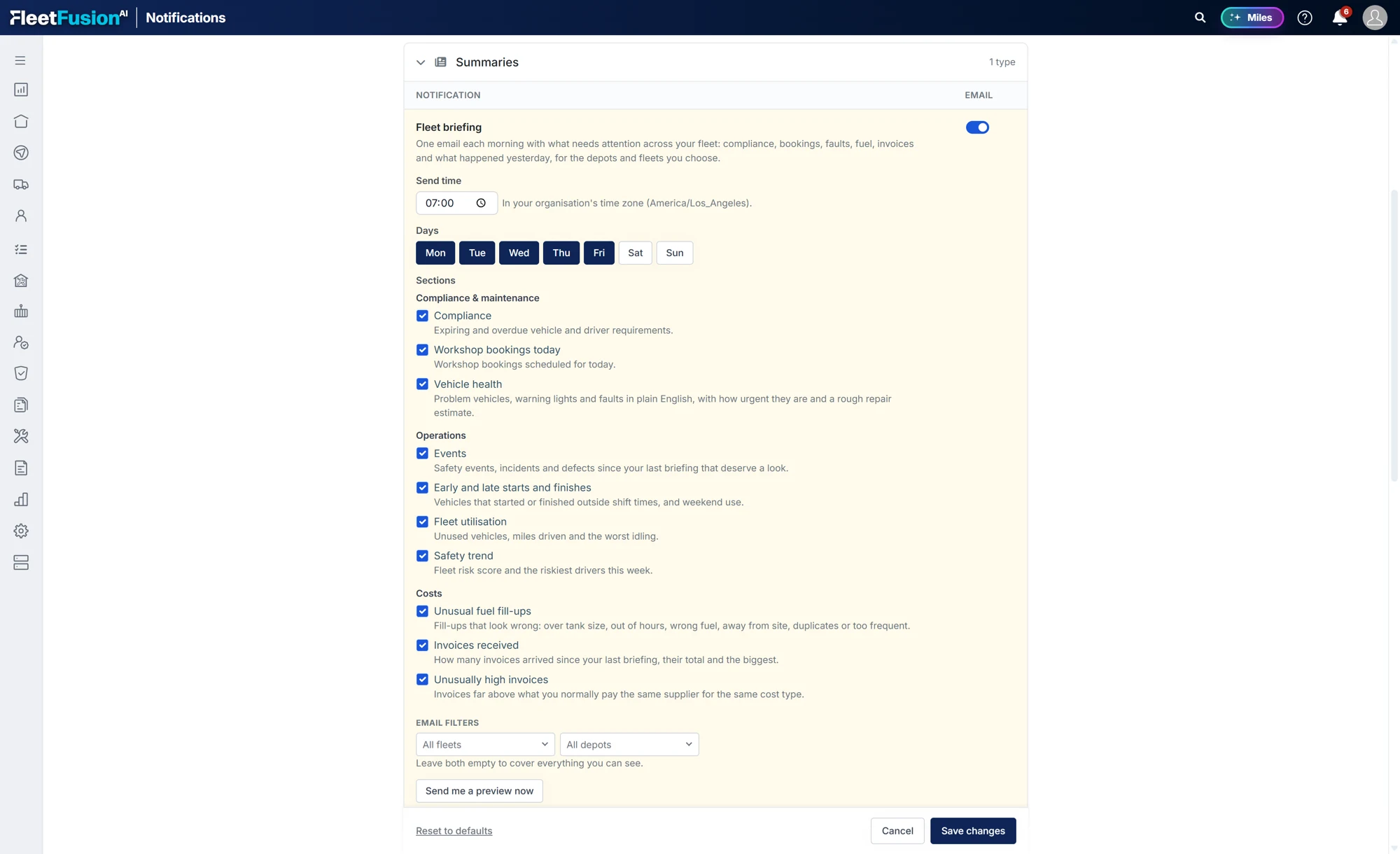
- Each user chooses the send time, days, sections and fleets or depots. A “Send me a preview now” button shows you exactly what you’ll get.

Company car tax: P11D for UK drivers and BIK for Irish drivers New
FleetFusion now works out the taxable benefit of company cars for each driver, using the official UK and Irish rate tables, so payroll and P11D returns come straight from your fleet data.
- UK benefit in kind is calculated from each car’s list price, real CO₂ figure, fuel type and electric range, for the right tax year. That includes the bands from April 2027.
- Irish BIK uses Ireland’s own rules and labels, so UK and Irish drivers each see the correct statement.
- Each driver has a Tax tab showing their cars, the days each was available and their benefit, with a statement you can preview.
- The P11D report includes a working sheet showing how each figure was reached. Payroll export goes to Excel.
- Set the tax country on vehicles and cost centres. P11D and BIK reports can be scheduled and keep the tax year they were saved for.
Vehicle Diagnostics dashboard and 3D vehicle health New
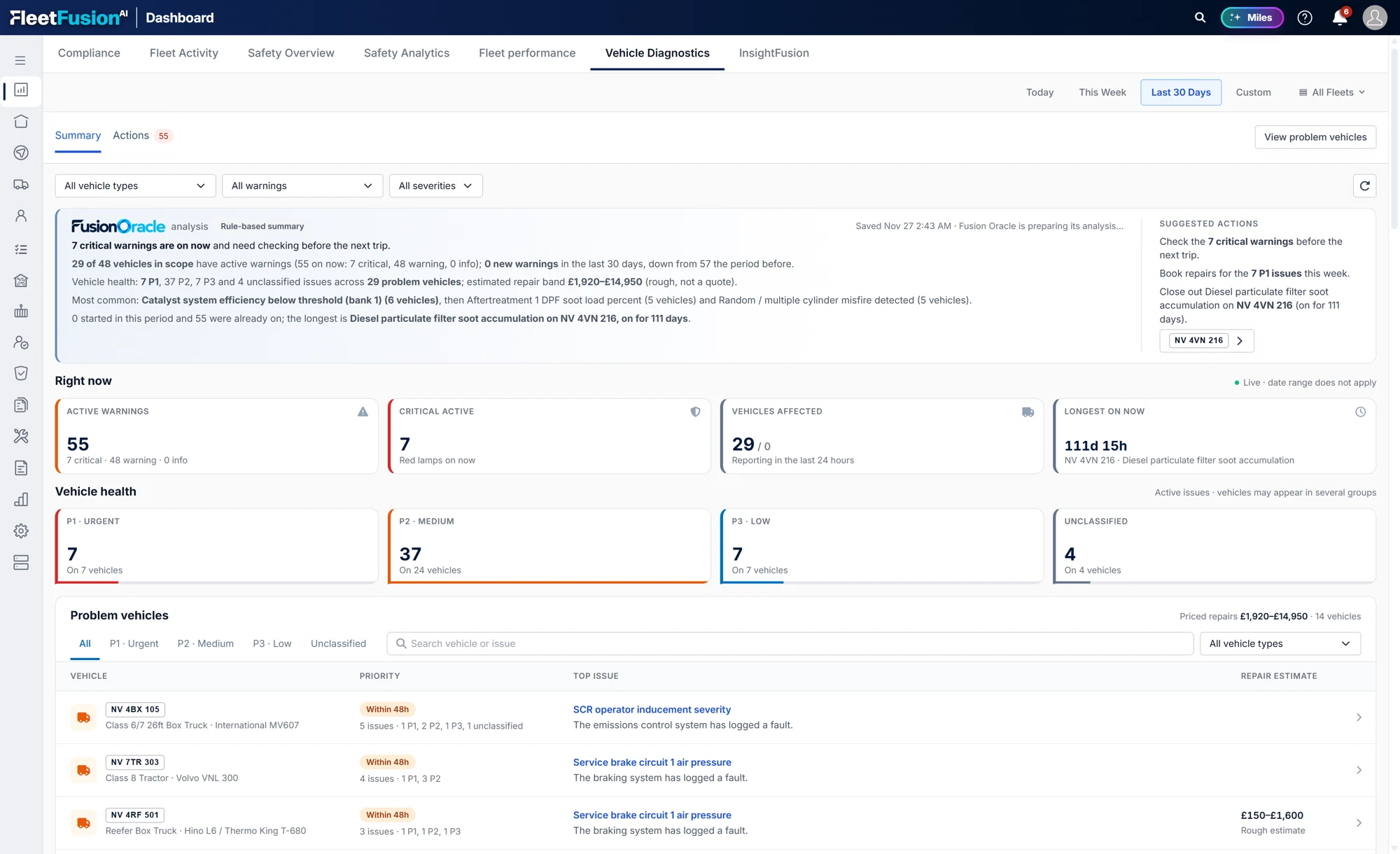
A new Vehicle Diagnostics dashboard ranks every open problem by priority, explains what to do next and lets you raise a work order straight from a fault.
Needs CAN-bus hardware on the vehicle. Also works with Geotab and Samsara.
- Problems are ranked P1 to P3. Warning lights are triaged by severity, so a red brake, coolant or oil light shows as Stop now.
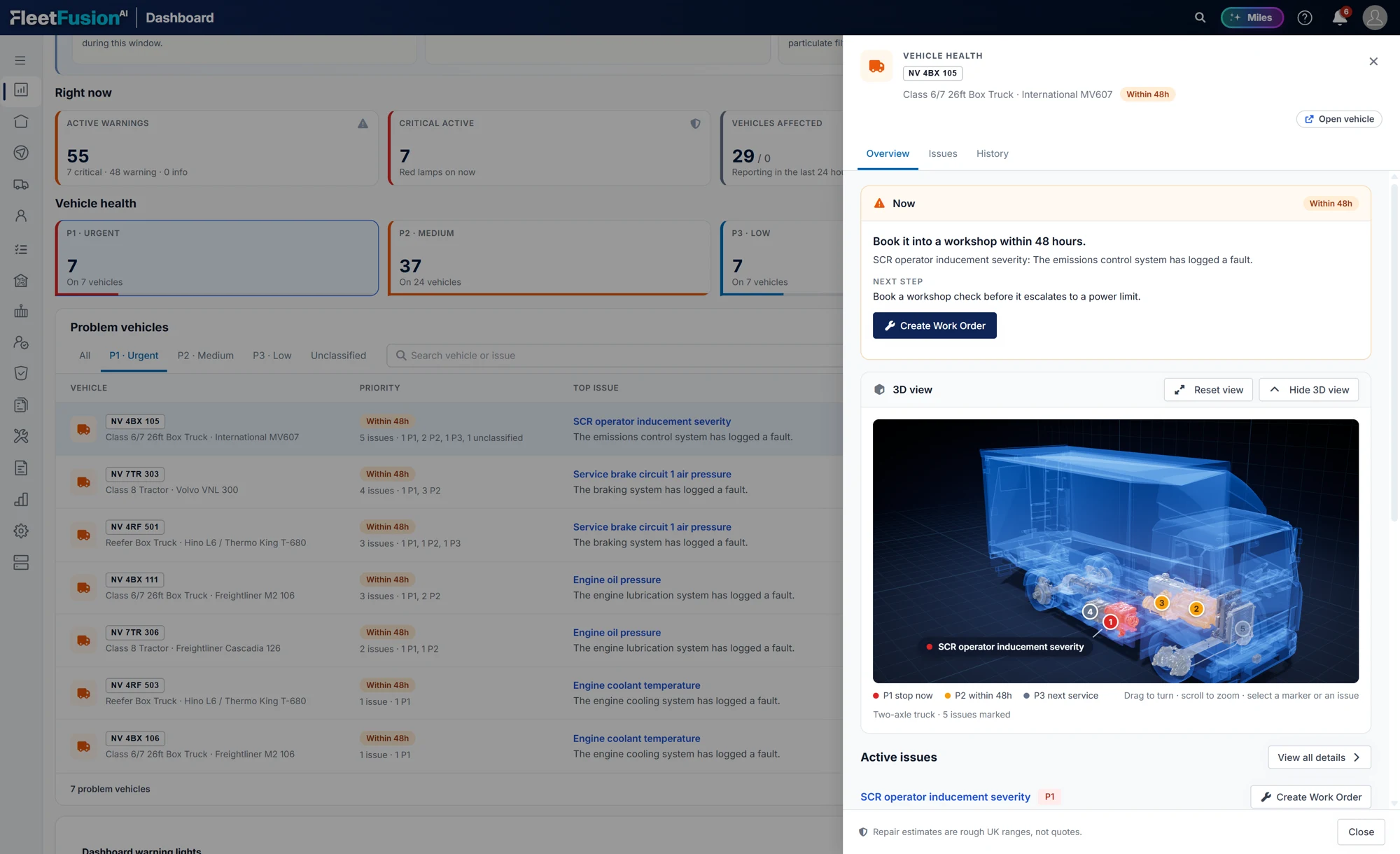
- A 3D “X-ray” of the vehicle lights up the affected parts, from vans and rigids to trailers and buses.
- A timeline of faults with distance and engine hours between them makes repeat faults easy to spot.
- A Fusion Oracle summary picks out what needs checking before the next trip and suggests actions, with a rough repair-cost band.
Full details are in Diagnostics and vehicle health.
Posted speeding for every vehicle
Speeding against the posted road limit is now detected for any vehicle that reports GPS and speed, with clips fetched automatically.
Settings are now simply On or Off with three levels: Relaxed, Standard or Strict. A new Maximum speed rule and your own labels for event rules complete the change. Full details are in Safety and driver behaviour.
Compliance documents with full history
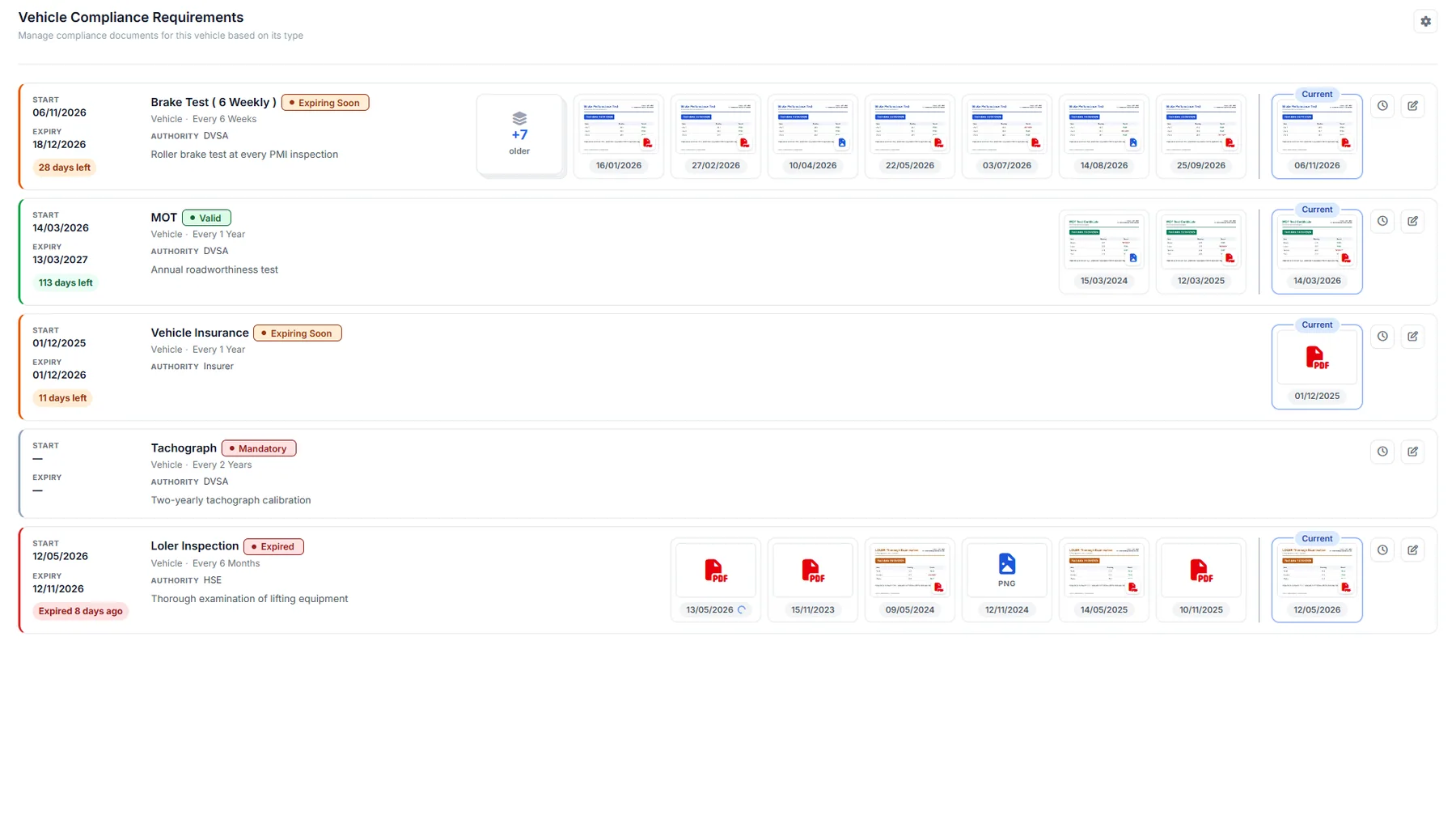
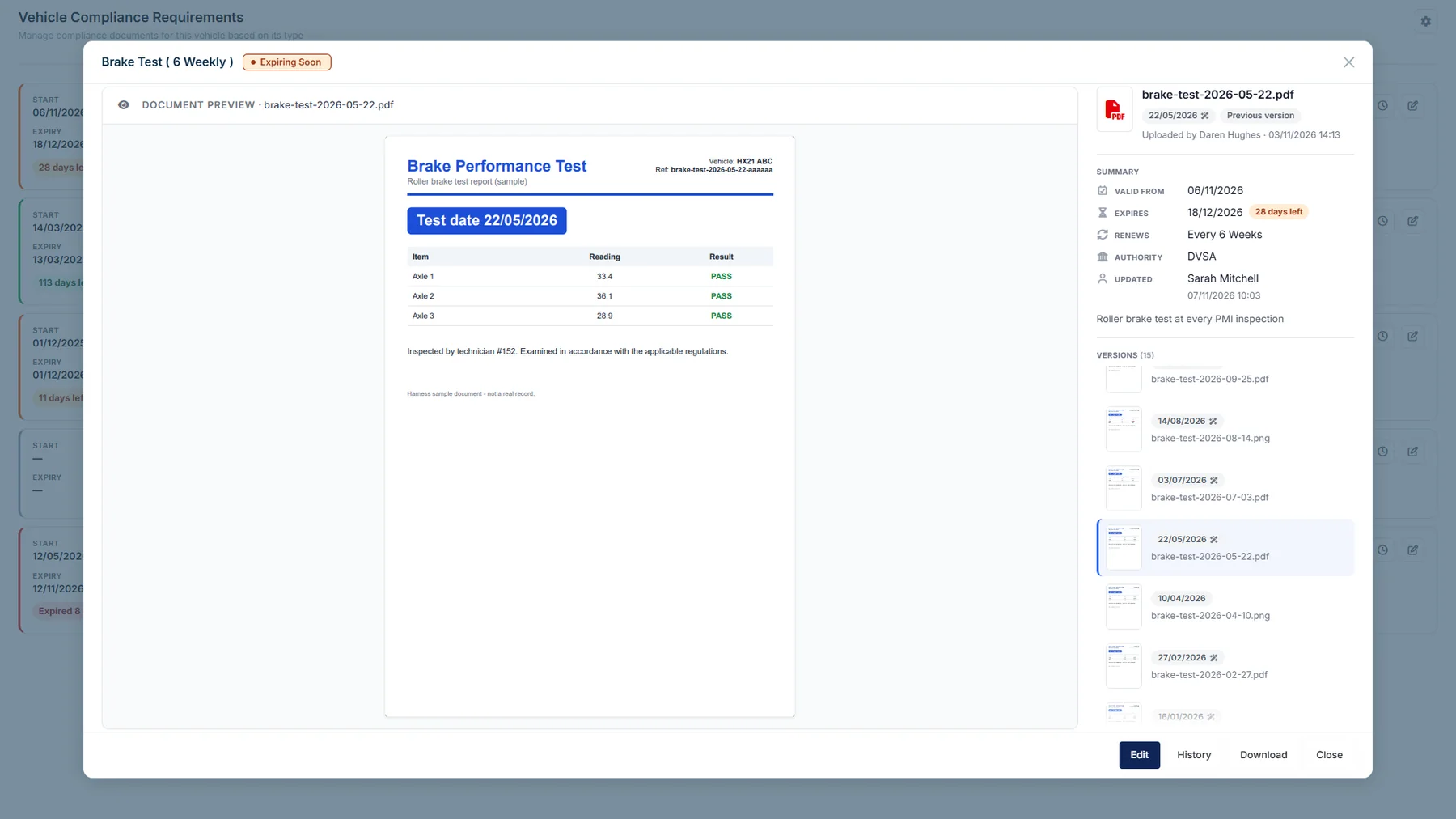
Each compliance item now keeps its current document plus any number of earlier ones, with thumbnail cards and a large preview.
Fuel: statement import and fill-ups from vehicle data
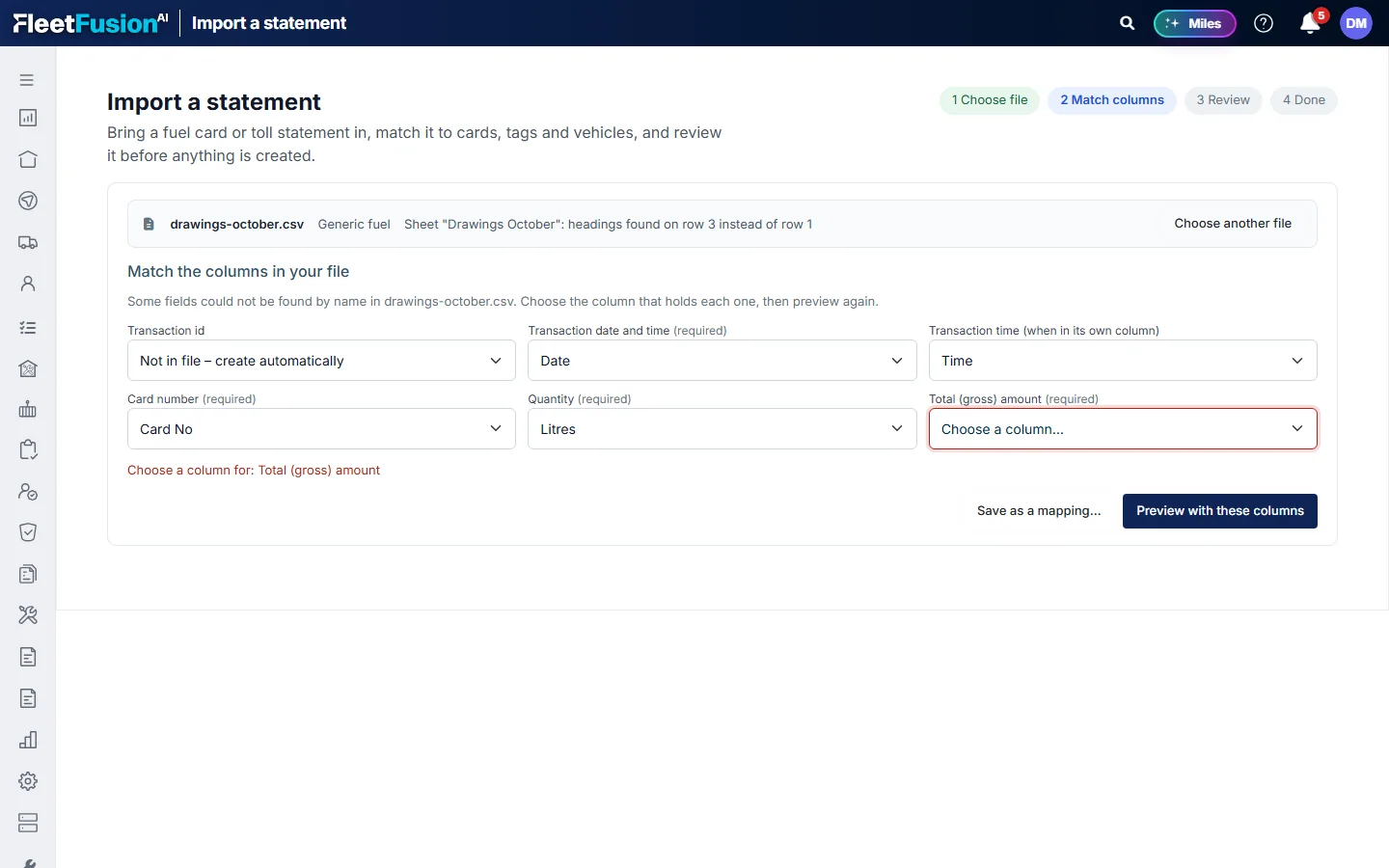
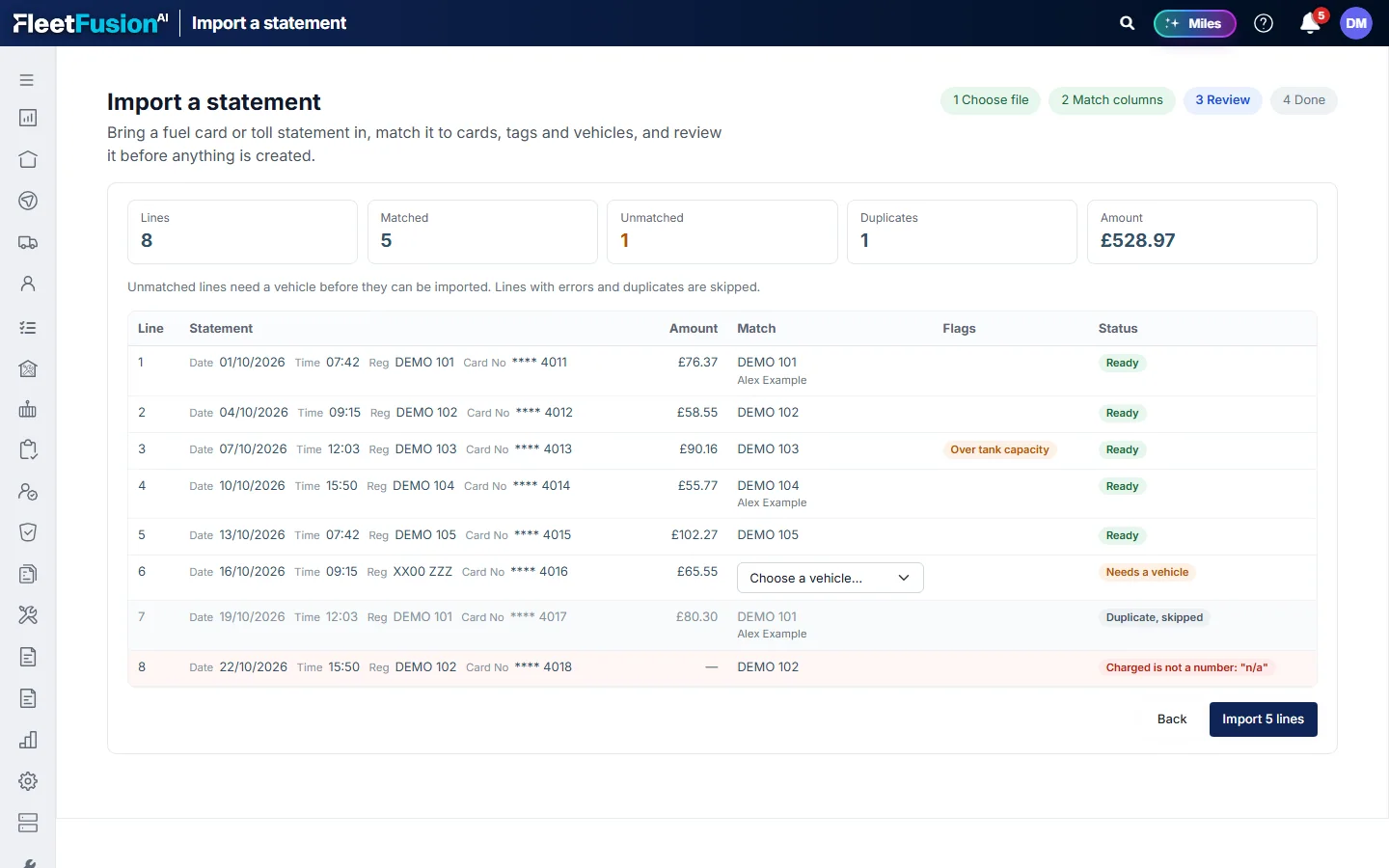
Import fuel card statements in any layout, and record fill-ups straight from the vehicle’s own fuel-level data where you don’t have a fuel card feed.
Cameras and video
Driving-event emails you control
Pick which event types you’re emailed about and how often, and send them to a separate notification address if you like. The hourly digest now also includes events that arrive after the hour they happened in.
One email design, with your branding
Report emails, video-ready emails, geofence alerts, work-order emails and welcome emails now share one branded design that works in Outlook and on phones. The video-ready email includes a picture from the clip you requested. Partner-branded companies see their partner’s logo and colours.
Share an event by email
A Share button next to Request video sends an event to up to 20 addresses. Each person gets their own link that opens the video player read-only, with no login needed. You choose whether the links expire after 24 hours, 7 days or 30 days, and you can revoke any of them.
Allocate a driver to an event
The event player shows the driver, with Change driver, or Allocate driver when none is known. Coaching an event that has no driver asks you to pick one first.
Downloads from parked and busy cameras
Request a clip while a vehicle is parked and FleetFusion wakes the camera and fetches the clip instead of failing. A busy camera is retried at sensible intervals, and the player shows when the next attempt will be. Live view tells you when a camera is asleep and may be slow to start.
Wake button for Streamax and SelectCam
The Wake button on the tracking page now works for Streamax cameras, which reconnect within about two minutes. SelectCam cameras can also be woken on demand.
Clips keep their sound
Event clips and downloaded clips from Streamax cameras now include the camera’s audio.
Download lengths follow your plan
Manual download lengths follow your plan’s SD and HD limits, in 5-minute steps, in the portal and the Geotab Vision add-in.
Better playback and requests
- SelectCam playback uses the HD stream only when a channel has no SD recording, and you can now edit each camera channel’s role.
- A failed video request has a Request again button. Request cards show the window, the centre time, the length and when it was requested.
- Media has a new With notes filter, so you can find events a reviewer has commented on.
SelectCam improvements
Loss of video on a SelectCam channel now raises a video-loss event, rate-limited so it can’t flood you. The Device Hub shows the camera’s power state and refreshes itself every 30 seconds.
AI Driver ID on new face models
AI Driver ID now uses face-recognition models licensed for commercial use. Matching works as before.
Tracking, maps and trips
A faster Tracking page for large fleets
The Tracking page and vehicle list now load from a summary that is kept up to date continuously, so large fleets open much faster. Live positions update together instead of one vehicle at a time, and selecting a vehicle on the map is more reliable.
Search by device ID
Tracking search now matches a device’s IMEI or serial number as well as the registration, in the tracking list and the asset list.
Follow, Vehicle info and Zoom to all
The map has a Follow toggle (on by default) that keeps the selected vehicle centred without changing your zoom. A Vehicle info toggle shows or hides the vehicle card, and a Zoom to all button fits the whole fleet. These controls work in the portal, the Geotab add-in and the video add-in.
Multi-day routes and clearer replays
- Pick a date range of more than two days to see every trip’s route on the map, up to the latest 31 days.
- During trip replay, the part of the route already driven is highlighted.
- The 3D map only re-centres on the selected vehicle when it moves.
Clearer vehicle status
- A vehicle that is connected but has no GPS fix shows “No GPS” instead of a misleading “Parked”.
- On vehicles with both a tracker and a camera, an amber marker shows when the camera’s last contact is more than an hour behind the tracker.
Satellite 3D
Satellite 3D loads much faster, and slower PCs that used to fall back to 2D can now show it. A linked tractor and trailer are drawn as one articulated rig with both plates. Satellite 3D is part of the Enterprise edition and is available to other companies on request.
Your map settings follow you
Your chosen map style, 3D setting and geofence map style are saved to your account, so they follow you between the portal, the add-in and other devices. Google Maps and Google Satellite styles can be added on request.
Speeds in your units
Speeds follow each user’s units everywhere, including the dashboard event panel, incident clips and the add-in’s vehicle information.
Diagnostics and vehicle health Needs CAN-bus hardware on the vehicle. Also works with Geotab and Samsara.
Where to find it: Dashboards → Vehicle diagnostics and each vehicle’s Diagnostics tab in the portal, plus the Diagnostics screens in the MyGeotab add-in.
Vehicle health board
The diagnostics dashboard ranks every open problem as P1, P2, P3 or Unclassified, with “Right now” figures and a list of problem vehicles. Click a vehicle to open a side panel with Overview, Issues and History tabs. Its Now card shows the most serious root cause and the next step to take, and History shows the repair journey. The same views appear on the vehicle’s Diagnostics tab and in the Geotab add-in.
Warning-light triage
Warning lights are triaged by how serious they are. A red brake, coolant or oil light, for example, is marked Stop now. Each light shows a chip naming the system it came from.
Diagnostics timeline
Each vehicle has a timeline of warning lights and fault codes, showing the distance and engine hours between events, so repeat faults stand out.
Fault codes decoded
Fault codes from heavy vehicles, cars and vans are matched by code, make, model and component. Where the information is known, you also see the urgency, whether the vehicle is safe to drive, and a rough repair-cost band.
3D X-ray of the vehicle
A 3D model of the vehicle highlights affected parts in their priority colour, with a numbered marker for each current issue. Click an issue to fly the camera to that part, or hover over a part to preview its fault.
- Models cover panel and Luton vans, 7.5t and 26t rigids, tractor units, curtain, fridge and tanker trailers, single and double-deck buses, and cars.
- A Cost of waiting panel compares fixing the fault now with waiting up to 30 days.
Create a work order from a fault
Create Work Order opens a pre-filled work order linked to the fault and stops a second job being raised for the same problem. An open job shows as a chip with a Book in option.
Alerts you can opt in to
- Critical vehicle fault: an alert when a vehicle develops a critical fault, sent at most once per vehicle and problem in 24 hours.
- Fault-data health: admins can be warned when a vehicle data feed stops sending fault or warning-light data while the vehicles are still reporting.
More sources, more reliable data
- Fault codes from Samsara-connected vehicles now appear alongside Geotab ones, with stop lamps marked Critical and warning or emission lamps marked Warning.
- Diagnostics follow each user’s language in the portal and the add-in.
Fuel fill-up detection from CAN-bus data Company setting
Where you don’t have a fuel card integration, FleetFusion can record fill-ups from the vehicle’s own fuel-level data. To turn it on, go to Organisation settings and switch on “Detect fill-ups from CAN data”.
- When the fuel level rises by at least 10% of the tank while the vehicle is stopped or the ignition is off, FleetFusion adds a fill-up to the fuel log. Where the tank size is known, a rise of 20 litres that is also at least 5% of the tank counts too.
- Each fill-up records the location and the nearest fuel station within 150 m.
- Litres are worked out from the vehicle’s tank size. Without a tank size, only the percentage rise is recorded.
- AdBlue fills are detected the same way where the vehicle reports its AdBlue level.
- A fuel card or manual entry for the same fill takes priority, so you won’t get duplicates.
- Detection works for any vehicle whose tracker or vehicle data feed reports a fuel level. It can’t be switched on while a fuel card integration such as Shell is linked, because card transactions are the better record.
Vehicle and trailer height from RFID tags
Each vehicle can now have a height. For trailers fitted with height RFID tags that a Streamax camera reads, the height is set from the tag automatically. You can also enter it by hand on the vehicle’s Telematics tab.
Safety and driver behaviour
Posted speeding for every vehicle
Speeding against the posted road limit is detected for any vehicle that reports GPS and speed, and clips for speeding events are fetched automatically. It was switched on for every existing company on 17 November.
Simpler speeding settings
Speeding is On or Off with three levels: Relaxed (5, 8 and 20 mph over the limit), Standard (3, 5 and 15) and Strict (2, 4 and 10). Companies that use km/h get metric thresholds, and older custom thresholds keep working until you change them.
Maximum speed rule and your own labels
- A new Maximum speed rule raises an event above a speed you set, between 5 and 150 mph, for a fleet or a vehicle.
- Give any rule your own label, which then appears on event lists, event details and emails.
- The Event and video rules pages have search, an “only rules that raise events” filter and a plain-English description of each rule.
Safety analytics dashboard
A 20-tile Safety analytics dashboard in the portal and the Geotab add-in covers driver risk, insights, triage, media and coaching. It supports cross-filtering, count and rate views, and drill-downs. You can export to Excel or PDF, share it with just yourself, your organisation or chosen roles, and schedule it by email.
Event triage and coaching
- Triage: star, hide or mark events invalid, raise disputes with a “more info” step, and act on many events at once.
- Coaching: a coach panel, a coaching catalogue and automatic case rules, including High Five recognition. Drafts wait for approval, and the session viewer shows the tip and a link to the training.
Safety and Risk settings
A new Settings → Safety & Risk area brings Safety Score, Risk score and Speeding settings together, in the portal and the add-in.
Compliance, licences and documents
Compliance documents with full history
Each compliance item keeps its current document plus any number of earlier ones, and dropping in an old file never replaces the current one. AI reads the date on each earlier document, but a date you type in yourself always wins. Cards show thumbnails with the current document marked, and a large preview shows any version with its dates, on desktop and phone.
Automatic DVLA licence checks
For companies using DVLA checks, licences of drivers with a mandate in place can be checked on a schedule. Drivers are checked more or less often depending on their risk, with extra checks after speeding. Fleet and depot managers are emailed when something changes, and findings appear on the driver’s licence tab. A DVLA mandate can be sent from the driver page.
Licence blocking options
Block mode now covers invalid, disqualified, revoked and surrendered licences. New options can also block drivers whose licence submission or DVLA check is overdue, after a grace period.
Document sign-off
Document types can require drivers to sign them. Each version is tied to the exact file, reminders and escalations go out automatically, and a “Document sign-off outstanding” report shows who still needs to sign. Paper sign-offs are recorded against the version signed.
Walkarounds
- Before a walkaround, the driver app can show any of the vehicle’s compliance items that are expired, missing or due soon. It also shows recent checks of trailers and assets the driver has used.
- Walkaround defects now take a vehicle off road (VOR) in the same way as other defects.
- There are new Vehicle issue and Vehicle return checklist types, with a side-by-side comparison.
- Walkaround defects can be searched by asset number, and admins get walkaround emails only if they opt in.
Compliance planner
The Calendar, Maintenance and list views work independently, and overdue requirements now escalate.
Fines and PCNs
- Surcharges apply the day after the deadline, and a rejected or withdrawn appeal pauses the surcharge for 28 days.
- PCN discount deadlines are taken from the date on the notice.
- A fine can be linked to a contract.
Costs, fuel and finance
Fuel card statement import
Import statements from Keyfuels (including “drawings” exports) or any other provider. FleetFusion finds the header row and the right sheet, matches column headings even when the wording differs, and offers a Match columns step for anything left over. Duplicates and bad rows are explained instead of stopping the import.
Fuel and CAN report
The Fuel and CAN report always shows an estimated cost. It uses your own average fuel price first, then your set fuel price, then the UK government’s weekly pump price. New tiles show AdBlue used and its value. The report lists every fill-up in the period, grouped by vehicle.
Currency conversion everywhere
Costs in other currencies are converted using daily European Central Bank rates, which you can override for your company. This applies across the Costs tab, benchmarks, contract statements, whole-life costs, incidents, fees and rental invoices. Rows that can’t be converted are flagged, never dropped.
Total cost of ownership, rental invoices and benchmarks
- Total cost of ownership ranks vehicles by operating cost, with Tyres, Lease and EV columns.
- Rental invoices can be added and edited. They flag a different currency, a supplier that doesn’t match the contract, and possible duplicates.
- The depot benchmark has been redesigned with KPI tiles, ranking, comparison, trend and heatmap views.
- Utilisation is now days used ÷ working days. Vehicles with no trips are included, and the dashboard figure agrees with the report.
Maintenance and workshop
External workshops page
External workshops have their own page, with search, filters, open bookings, open work orders and the last booking, plus a summary side panel. In the add-in it is under Maintenance → Workshops.
Send work orders by email or Outlook
From a work item, Open in Outlook creates a ready-to-send email with the attachments included. Plain email sends a link that expires after 30 days.
Scan to a work order
A Scan button beside Upload lets you scan pages with your phone, which are saved as one PDF on the work order.
Reports and dashboards
Redesigned report PDFs
Every report exports as a clean A4 PDF with your logo, the period and scope, KPI tiles, charts, the table in on-screen order, and page numbers.
Detailed Journey report
The Detailed Journey report adds idle time, fuel used and MPG (or L/100km), and red, amber and green events. Rows are colour-coded by idle time and events.
Richer scheduled report emails
Scheduled report emails can include KPI tiles, up to three charts and a summary table in the email itself, alongside the attachment.
Fleet admin, users and settings
Units per user
Each user can choose their own distance and volume units from the user menu, falling back to the company default, in the portal and the add-in.
Depots, fleets, drivers and vehicles
- The Depots and Fleets pages have new summary tiles and search. Operator licences and insurance policies can be added, edited and linked from inside a fleet or depot.
- Drivers can be edited and deleted from Settings → Drivers.
- The vehicle list has Driver, Contract and Allocation filters, search matches the driver’s name, and Breakdown now counts as off road.
View camera footage permission
A new permission lets you give some users tracking only, with no camera images or video.
Organisation settings
Organisation settings use a two-column layout with one Save bar and a warning about unsaved changes.
Integrations
- Aquarius ClockWatcher: connect your account to import 28 days of driver duty, infringements and card-download dates. They appear on the tacho board and the driver-hours card.
- Geotab comments: each vehicle’s Comments box in MyGeotab syncs into a FleetFusion note marked “Synced from Geotab”.
Sign-in and security
- A new login page design, with the Organisation field on the page.
- Resetting a password, deactivating a user or deleting a user signs that user out everywhere.
Languages, errors and help
- 595 more screens and messages are translated, errors appear in each user’s language, and English (United States) is available for US companies.
- Dozens of screens that showed an empty list when loading failed now show a clear error with Try again.
- Help articles show screenshots from the app you’re using, and many more have been added.
MyGeotab add-in
- FleetFusion-only vehicles, which have no Geotab device, now appear on the tracking map, live view, Fleet Watch and activity search.
- US companies get US wording, the DVIR (vehicle inspection) menu, US state on vehicles and “Gas” instead of “Petrol”.
- Detail pages have a single-row header, Depots and Fleets use the standard tables, and Fleet Watch cards are taller.
- Error banners have a Try again button, and each MyGeotab user on a shared computer accepts the licence terms themselves.
- The new map controls, diagnostics views, safety dashboard and workshops page are all available in the add-in.
Available on request Released and ready, but switched on per company. Ask your account manager.
Fusion Agents
AI agents that take routine chasing off your team. Every action is listed with its status, next step and owner, in the portal and the add-in.
- Booking agent: emails a workshop to book an appointment, follows up by phone if needed, reads the reply and asks you only when a decision is needed.
- Maintenance chaser: follows up overdue repairs by email and then by phone. You approve any new return date.
- Automation: an automation rule can hand a task to an agent. Each agent has Test, Live and Simulation modes and a named owner.
AI phone booking for workshops
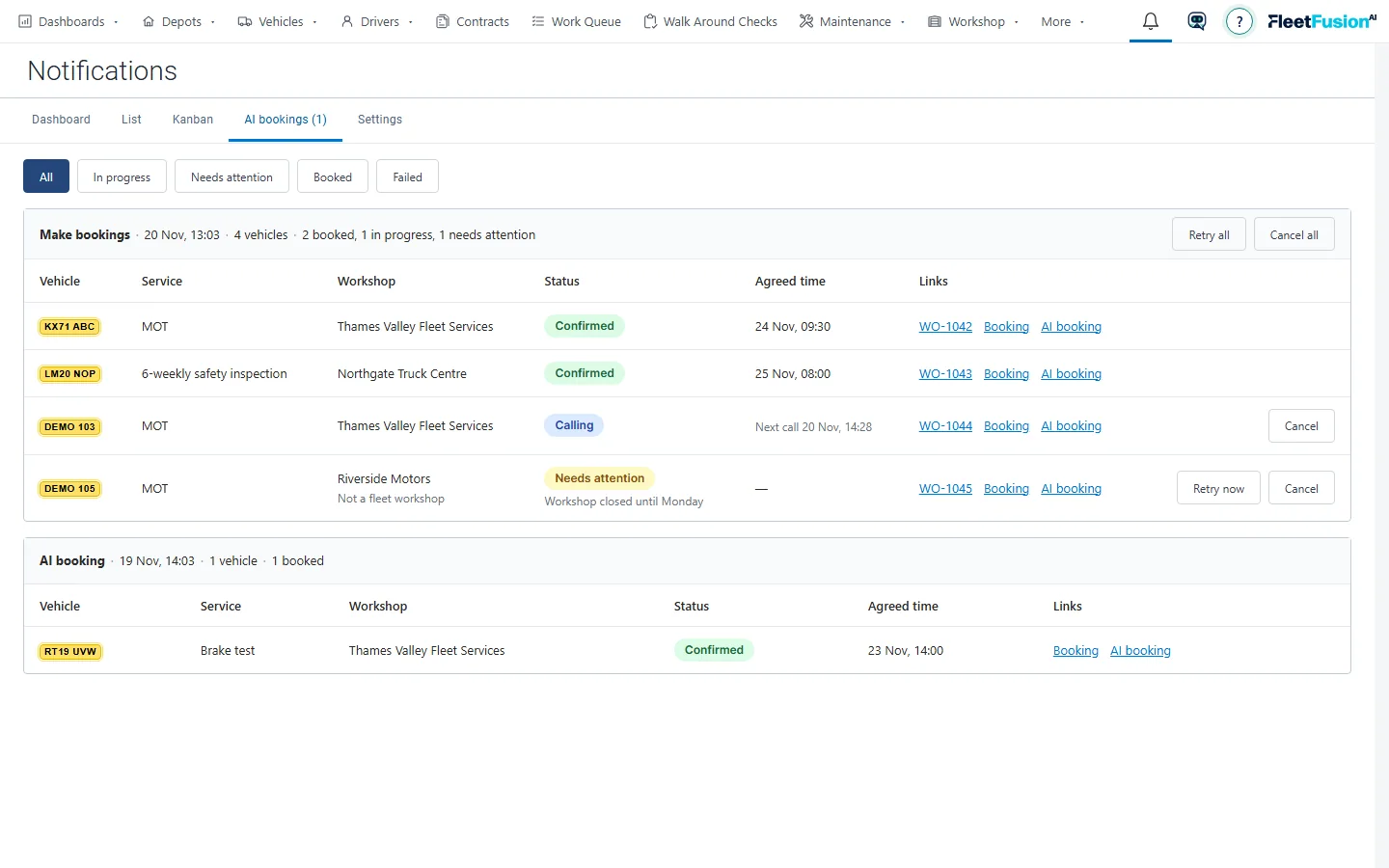
An AI voice agent phones your external workshops to book services and MOTs. “Let AI find a time” holds a provisional booking while the call agrees a slot, and “Make bookings” books many vehicles at once from the compliance planner. Progress, outcomes and downloadable transcripts appear on the AI bookings page. Calls use the workshop’s local time, and the agent says it is an AI.
AI Fusion credits
One monthly allowance of AI credits, based on your edition and fleet size, covers Miles, Fusion Oracle, document reading, AI phone bookings and the agents. Usage, Payment and Invoices tabs show the allowance meter, daily use, use by feature and top users. You can set an optional spend cap.
HealthDrive wellbeing and lone-worker alarms
Under Drivers → HealthDrive there is a wellbeing overview with readiness and sleep charts, and drivers can be invited by QR code or email. Lone-worker panic alarms show live banners with sound and the latest location on a map. Each alarm can be acknowledged and resolved, and duty contacts can be set.
RouteFusion
For companies using RouteFusion, you can now plan from any depot with any vehicle you can see. There is also:
- a six-step vehicle setup wizard for size, weight and hours;
- order import from Excel or CSV with column matching;
- a configurable orders list;
- a new plan wizard and plan board.
US Compliance
CSA and DOT inspection pages and printouts now say when the carrier setting is missing, and a failed lookup shows an error instead of looking like “no data”.